Stop Motion Studio
- 4.1
- Rating
- 10.00M
- Installs
- Free
- Price

 Analysis by App-foxy
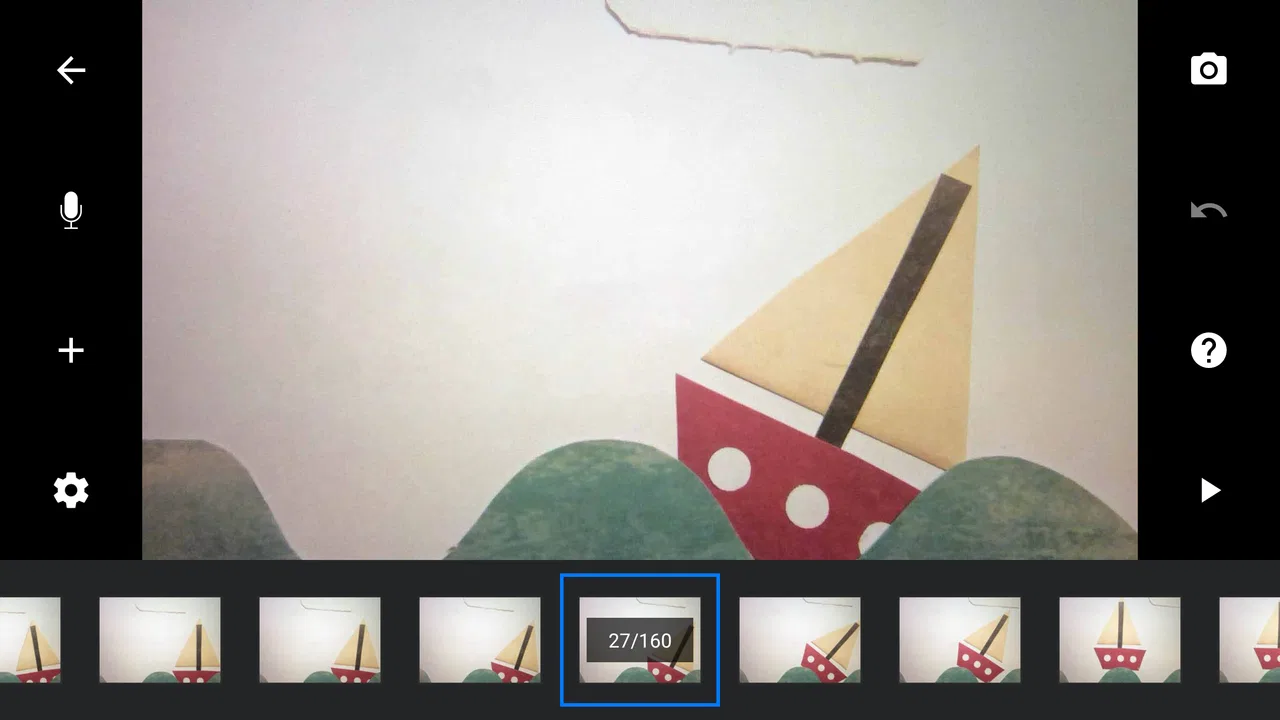
I approached Stop Motion Studio as someone who wanted to turn ordinary objects into short animated scenes without learning a full desktop production program. Cateater’s photography app is built around stop-motion filmmaking, and that focus makes it feel very different from a normal camera editor. Instead of taking one picture and improving it afterward, I work frame by frame, moving a subject slightly between shots and watching the illusion of motion take shape.
That distinction matters. This is not mainly an app for applying filters to finished photos, nor is it a conventional video editor that expects a continuous recording. It is a small animation workspace for planning, capturing, reviewing, and refining a sequence of still images. I found it most appealing when I wanted control over movement and timing rather than a quick result.
How the app fits into real stop-motion work
The basic idea is simple, but stop motion rewards patience. I place a toy, drawing, food item, craft project, or other subject in front of the camera, capture a frame, move it a little, and capture again. Repeating that process creates the final animation. The app’s store summary calls it powerful and easy to use, but the useful part of that promise is the way it brings the capture process and the animation timeline together in one place.
You May Also Like

 Google Keep - Notes and lists
Google Keep’s Quiet Growth Shows the Appeal of Simpler Notes
As mobile work gets busier, Google Keep keeps winning a simple contest: capture a thought quickly, find it later, and get on with the day.

 Blood Strike: 2.5 Anniversary
Blood Strike’s Loadouts Turn Every Drop Into a Tactical Gamble
A close look at Blood Strike’s custom loadouts: how fast access to signature weapons reshapes its battle royale rhythm, rewards preparation, and narrows the gap between fights.

 Pandora - Music & Podcasts
Pandora’s Music Is Easy to Start, but Harder to Recover
Pandora’s strength is its low-effort path from a seed to a station. Its weak spot is how much confidence it asks you to place in connection, setup, and quiet recovery.

 8 Ball Pool
 Is Built on Rivalries, Rematches, and Routine
A close look at the rivalries, rematches, shared routines, and unanswered safety questions that turn a quick pool match into a persistent mobile community.

 Samsung Music
’s Quiet Strength Is Playing What You Already Own
Its reach comes less from spectacle than from dependable access to a personal library. That simplicity is both the app’s strongest retention engine and its ceiling.

 AccuWeather: Weather Radar
AccuWeather Review: A Quick, Clear Forecast for Everyday Decisions
For everyday plans, the best forecast is the one you can understand quickly. AccuWeather makes rain timing, radar, and local conditions easy to act on, with a few trade-offs.
More From Our News Desk



For a first project, I would begin with something deliberately small: a paper figure walking across a desk, a cup appearing to fill with pencils, or a set of building blocks assembling themselves. A short scene teaches more than an ambitious story because every movement has to be planned. Stop Motion Studio makes that learning process approachable enough for a child, a casual creator, or a parent helping with a school project, while still leaving room for more careful work.
One practical strength is that the camera is used as part of an animation workflow rather than as a separate tool. I can concentrate on keeping the phone in the same position, moving the subject in small increments, and checking the sequence as it develops. That reduces the need to capture images elsewhere and then assemble them in another application.
The app belongs in the photography category, although I think of it more accurately as a compact animation studio. Its age rating is Everyone, which suits the creative, family-friendly nature of the projects I would normally make with it. The developer is Cateater, and the app has been available since March 9, 2015, giving it a long presence compared with many short-lived creative utilities.
What the free access means for value
Stop Motion Studio is free to install, so the initial decision is easy: I can try the workflow without committing money first. That is important for stop motion because the technique is not for everyone. Some people enjoy moving a subject millimeter by millimeter; others quickly prefer recording ordinary video or using a simpler slideshow maker. Free access lets me discover which group I belong to before considering any optional spending.
The listed in-app purchase price is $5.99 per item. I treat that as a separate purchase decision rather than assuming that installing the app automatically unlocks every capability. The sensible approach is to start with a small project, understand what is available in the free experience, and only pay if a particular extra is genuinely useful for the way I work.
That pricing structure gives the app two kinds of value. For a curious beginner, the free entry point is the main benefit. For someone who repeatedly creates animations, a paid item may be worthwhile if it removes a limitation that affects a regular workflow. I would not buy anything simply because the app has a professional-sounding feature list; I would first identify the exact part of my process that needs improvement.
The current version is 25.08.8578, and the minimum operating system is Android 7.0. That makes compatibility worth checking before planning a project, especially if the device is older or shared with children. A stop-motion session can become frustrating when the phone is not comfortable to use, so device support is part of the value calculation even when the app itself is free.
A realistic everyday project
Imagine I want to make a short birthday message for a friend. I could arrange letter tiles on a table, photograph them in a scattered position, and gradually move them into a readable sentence. The setup would not need a studio: a stable surface, consistent lighting, and a phone positioned so it does not move would be enough to begin. I would capture a few test frames first, play them back, and look for jumps caused by moving the tiles too far.
The important lesson is that the app cannot rescue careless physical setup. If the phone shifts halfway through the sequence, the background will appear to jump. If daylight changes near a window, the brightness may fluctuate from frame to frame. If I move an object too much between captures, the animation will look jerky. The software helps organize the process, but the quality still depends heavily on preparation.
For this kind of message, I would keep the scene short and make the final movement easy to understand. A common beginner mistake is to capture too many unrelated actions in one timeline. I get a cleaner result by treating each action as a small beat: the first tile moves, pauses, and is joined by the next. Reviewing frequently prevents me from discovering at the end that an entire section needs to be repeated.
Three techniques that make a noticeable difference
My first practical tip is to use visual reference rather than relying only on memory. When I move a subject, I want to know where it was in the previous frame. A faint view of the earlier position, often called an onion-skin reference, is especially useful for smooth motion. It lets me make a controlled adjustment instead of guessing. For a walking figure, this helps keep the feet and body from drifting unpredictably.
My second tip is to separate camera stability from subject movement. I would place the phone on a firm support and avoid touching its position after the first test frame. Even a beautifully animated object will look unconvincing if the entire background shifts. If I cannot use a fixed support, I would make the scene simpler and avoid wide backgrounds where small camera movement is obvious.
My third tip is to think in timing before capturing a long sequence. A movement can feel slow or fast depending on how many frames I use and how long each frame remains visible. I would make a rough version first, watch it, and then decide whether the subject needs more intermediate positions. This is more efficient than trying to perfect every frame immediately, because the rhythm of the whole scene is easier to judge in playback.
A fourth useful habit is to keep the physical set unchanged between sessions. I would mark the positions of the phone, lights, and important props with removable tape. That way, if I need to continue the next day, I have a better chance of matching the original framing. This is not a glamorous technique, but it prevents the kind of continuity problem that is difficult to fix after capture.
Where it feels stronger than ordinary alternatives
Compared with a standard camera app, Stop Motion Studio is better suited to deliberate animation because the subject is expected to change between images. A normal camera can capture the frames, but it does not necessarily encourage me to think about sequence, playback, and incremental movement in the same workspace. For a stop-motion idea, that extra focus is more useful than a large collection of photo effects.
Compared with a conventional video editor, the app is more direct when the source material is made of individual photographs. A video editor is often better for cutting continuous footage, adding together clips, or building a polished presentation from existing media. I would choose that kind of tool when my project begins with live recording. I would choose this app when the animation itself is created by moving objects between still frames.
Compared with a slideshow maker, the creative control is different. A slideshow mainly displays separate images in sequence, while stop motion depends on small changes that create the impression of movement. If I only want to show vacation photos or family pictures, a slideshow tool is likely less demanding. If I want a toy to walk, a drawing to transform, or a craft to assemble itself, this focused approach is the better match.
That focus is also a limitation. Someone looking for advanced cinematic editing, extensive audio production, or a broad post-processing suite may eventually need another application. Stop-motion capture is its reason to exist, so I would not judge it as a replacement for every kind of video software.
Tradeoffs I noticed while planning projects
The biggest tradeoff is the time required from the creator. The app can make the process less intimidating, but it cannot make frame-by-frame animation as quick as recording a normal clip. A ten-second result may require many careful decisions, especially when I want smooth movement. This is rewarding when I enjoy hands-on making, but it is the wrong choice when I need a finished video immediately.
Lighting is another source of friction. Stop motion exposes changes that might go unnoticed in a casual photograph. Moving shadows, flickering artificial light, and sunlight crossing the set can make frames look inconsistent. I would work indoors with steady illumination where possible and avoid placing the scene beside a window. The app is not at fault for these problems, but new users should know that capture conditions matter as much as camera technique.
Storage and organization also deserve attention. A project made from many frames is easier to lose track of than one quick photo. I would name projects clearly, review them before starting another, and avoid beginning a complicated animation when the device is nearly full. Keeping a simple project plan on paper can help too: scene order, prop positions, and the intended action for each section.
There is also a creative tradeoff between correcting a frame and accepting a small imperfection. If I notice a misplaced object immediately, retaking the last frame is usually easier than continuing and hoping the error will not show. But repeated corrections can slow the session and make the process feel rigid. I get better results by checking regularly without demanding absolute perfection from a playful project.
Who will get the most from it?
I think the app is a strong fit for beginners who want to understand how animation works by making something tangible. Children can use it for simple storytelling with toys or drawings, while adults can use it for classroom demonstrations, craft tutorials, short social posts, or personal experiments. The Everyone rating supports that broad audience, although younger users may still benefit from help with setup, lighting, and keeping the phone stable.
It also suits people who prefer visual, hands-on creativity. If I enjoy arranging objects, sketching scenes, building miniatures, or experimenting with practical effects, the app gives those activities a clear digital finish. The result feels more personal than applying a preset to an existing photograph because the movement comes from choices I make at the table.
The audience is substantial: the app has an average rating of 4.1 from around 125 thousand ratings and has passed 10 million installs. Those figures suggest that it has reached well beyond a niche group of animation specialists, though popularity alone does not guarantee that its workflow will suit me. I would still base the decision on whether I enjoy frame-by-frame work.
I would skip it if my main goal is instant video capture, automatic animation, or detailed editing of long recordings. I would also hesitate if I rarely have a stable place to set up a scene. The free installation makes trying it low risk, but the time investment is not trivial. Someone who wants polished results with minimal manual effort may be happier with a conventional video editor or an automated creative tool.
My final recommendation
After weighing the free starting point, the focused workflow, and the patience required, I see Stop Motion Studio as a worthwhile app for people who want to make animation rather than merely edit video. Its strongest value is not that it turns every idea into a finished film automatically. Its value is that it gives a beginner a manageable place to learn the relationship between movement, frames, timing, and physical staging.
I would recommend installing it before spending anything. Make a tiny test animation with a few objects, keep the phone fixed, use steady light, and watch the playback several times. That experiment will answer the most important question: do I enjoy the process enough to continue? If the answer is yes, an optional purchase priced at $5.99 per item can be considered on its specific usefulness, rather than as an impulse upgrade.
For me, the app earns its place when the project benefits from a handmade feel. A toy moving across a desk, a paper character changing expression, or a set of letters forming a message can become surprisingly engaging with careful frame work. The result may still show small imperfections, but those imperfections often make the animation feel personal.
My verdict is to try it for free, then pay only for a clearly needed extra. Cateater’s app is not the fastest route to a finished video, and it is not the right replacement for every photography or editing tool. However, for accessible stop-motion creation on a compatible Android device, it offers a focused and enjoyable way to turn patient physical work into a moving story.
FAQs for Stop Motion Studio
01What features does Stop Motion Studio offer for creating animations?
Stop Motion Studio provides a comprehensive set of tools for creating captivating stop motion animations. It includes features such as frame-by-frame editing, an overlay mode to compare frames, and the ability to add soundtracks and voiceovers. Additionally, it offers a grid mode for precision and a variety of filters and effects to enhance your animations.
02Is Stop Motion Studio suitable for beginners?
Yes, Stop Motion Studio is designed to be user-friendly, making it suitable for both beginners and experienced animators. The intuitive interface guides users through the animation process, and there are helpful tutorials available. Beginners can start with simple projects and gradually explore more advanced features as they become comfortable with the app.
03Can I export my animations to different formats with Stop Motion Studio?
Absolutely. Stop Motion Studio allows you to export your animations in multiple formats, including HD video, GIFs, and even as a series of images. This versatility ensures that you can share your creations across various platforms or incorporate them into other projects, offering flexibility in how you present your work.
04Is Stop Motion Studio available on both Android and iOS?
Yes, Stop Motion Studio is available for both Android and iOS devices. This cross-platform availability ensures that users can enjoy creating animations regardless of their device preference. The app is optimized for performance on both operating systems, providing a consistent experience across platforms.
05Are there any in-app purchases or subscriptions in Stop Motion Studio?
While Stop Motion Studio offers a range of free features, there are additional tools and effects available through in-app purchases. These purchases can enhance your animations with advanced features like green screen effects, advanced audio controls, and extra soundtracks. However, the basic functionalities are sufficient for creating high-quality animations without extra costs.
Pros
- Intuitive interface for easy creation
- Wide range of editing tools
- Supports 4K Ultra HD resolution
- Compatible with DSLR cameras
- Offers cloud storage integration
Cons
- Free version has limited features
- Some tools require in-app purchases
- Exporting can be slow at times
- Interface may feel cluttered
- No real-time collaboration features

Stop Motion Studio
Gallery